
Understanding Dive Computer Algorithms: Your Guide to Safe Diving
Updated: Mar 4
What is a Dive Computer Algorithm?
In simple terms, your dive computer algorithm is the mathematical brain that works behind the scenes. It calculates how long you can safely stay underwater and how slowly you should ascend. It’s constantly monitoring:
Your depth
Time at that depth
Ascent rate
Water temperature
Breathing gas mix
…and more.
All this data helps the computer estimate how much nitrogen your body is absorbing and releasing. The goal? To prevent decompression sickness (DCS) by keeping you within safe limits. Every dive computer does this same job, but they use different formulas to decide what “safe” means.
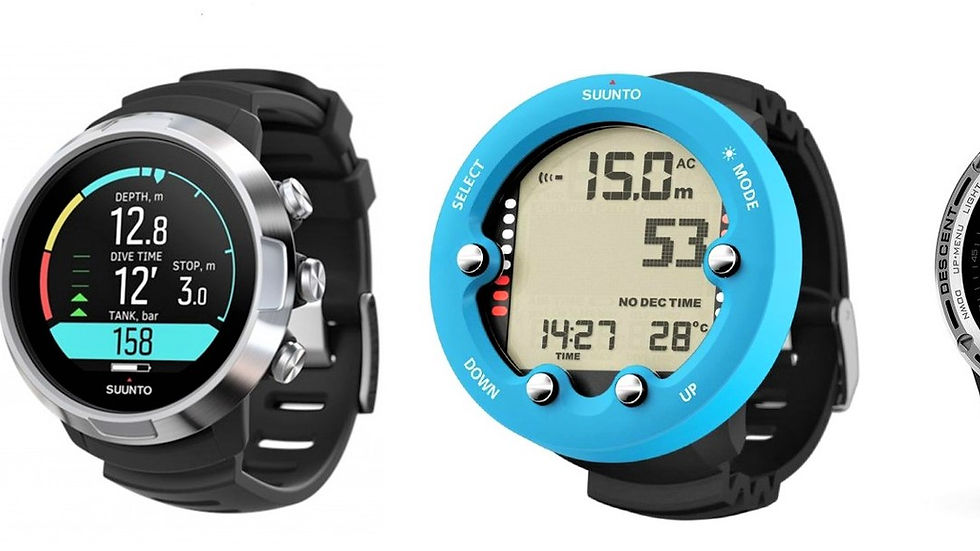
Why Are There Different Algorithms?
There’s no single way to calculate decompression. Over the past century, various scientists have created different models based on experiments, dives, and physiology research. Each model uses a slightly different approach to predict how gas moves in and out of our tissues and how to manage the bubbles that form during ascent.
That’s why one computer might allow a bit more bottom time while another gets you to start ascending sooner. In other words, all algorithms are trying to keep you safe — they just do it with their own personality. Understanding dive computer algorithms helps you choose the most suitable model for the type of diving you want to do.
The Main Algorithms Explained... Simply
1. The Haldane Model (The Original Theory)
In 1908, John Scott Haldane was the first person to apply a scientific approach to preventing and predicting DCS. Using goats as his test subjects, he discovered that the body can tolerate some degree of pressure change (gas elimination) without developing harmful effects. He theorised that parts of the body absorb gas at different speeds and used five different “tissue compartments,” each with different half-times, to model this and set limits on how much pressure change the body can safely handle. This early work laid the foundation for all modern dive tables and computer algorithms.
2. Bühlmann Algorithm (ZH-L16)
A few decades later, in the 60s, Dr. Albert Bühlmann built on Haldane’s work and developed one of the most widely used decompression models still in use today. Instead of the five compartments theorised by Haldane, Bühlmann used 16 (the number of tissue compartments identified in the ZH-L16), allowing for much longer half-times. This algorithm allows for adjustments using Gradient Factors, letting divers fine-tune how conservative or liberal the algorithm behaves. This model is popular with both recreational and technical divers because of its flexibility and transparency.
3. VPM – Varying Permeability Model
VPM looks at observations of bubble formations. Assuming that tiny bubble seeds exist in your tissues and can grow during ascent, this model tries to control bubble growth by adjusting decompression schedules. You’ll mostly see VPM used in technical dive computers, such as Shearwater (as an optional setting).
4. RGBM – Reduced Gradient Bubble Model
Developed by Dr. Bruce Wienke, RGBM looks beyond just dissolved gas and focuses on microbubbles that naturally form in your body during dives. It aims to minimize these bubbles by recommending deeper safety stops and slower ascents. RGBM is known for being more conservative, meaning shorter no-deco limits, especially on repetitive dives.
5. DSAT – PADI’s Recreational Algorithm
Developed by Dr. Raymond Rogers and the Diving Science and Technology (DSAT) team, this model was created for recreational divers and forms the basis of the PADI Recreational Dive Planner (RDP). It’s more liberal, allowing slightly longer bottom times for single, no-decompression dives. Used under the names Pelagic DSAT or Pelagic Z+.

Which Dive Computers Use Which Algorithms?
Brand | Algorithm | Conservatism | Notes |
|---|---|---|---|
Suunto | RGBM/Fused RGBM | Conservative | Focusses on bubble prevention; great for cautious or multi-day diving |
Shearwater | Bühlmann ZHL-16C (adjustable) | Customizable | Gradient Factors allow for precise control |
Garmin | Bühlmann ZHL-16C | Adjustable | Easy presets for conservatism levels |
Mares | RGMB/Bühlmann ZHL-16C | Moderate | Depends on the model |
Oceanic | Dual: DSAT & Z + | Flexible | Choose between liberal or conservative settings |
Cressi | RGBM | Conservative | Good for repetitive dives |
Aqualung | Pelagic Z+ | Moderate | Based on Bühlmann; customisable safety options |
Why Do Different Computers Give Different Readings?
Because they’re using different logic to do the same job. Even two computers with the same base model can vary since manufacturers tweak the algorithm or add their own safety factors. The Suunto might be extra cautious about microbubbles, while the Shearwater is more generous with bottom time but expects you to dive responsibly.
It’s not a competition — it’s just a difference in approach.
There’s no single best one; only the one that best suits your diving style:
Recreational diver doing single dives → DSAT (more liberal, longer bottom times)
Diver doing multiple dives per day → RGBM or conservative Bühlmann settings
Experienced or technical diver → Bühlmann with customisable Gradient Factors (e.g., Shearwater)
Cautious diver who likes a safety margin → Suunto or Cressi RGBM
All dive computers aim to keep you safe by calculating your nitrogen exposure. Some are a bit stricter, while others are more relaxed — but if you dive within your limits, ascend slowly, and make safety stops, you’ll stay well within the safe zone. Your computer’s job is to calculate; your job is to dive smart.
At Purple Dive Nusa Penida, we love helping divers understand their gear — not just using it. Knowing how your dive computer works helps you make safer, smarter decisions underwater.
If you’d like to learn more about dive computers, how to set the right conservatism levels for your dives, and generally develop your dive theory knowledge, chat with one of our instructors or join our PADI Professional level courses — we’ll help you master your dive computer and understand the theory behind it with confidence.


I liked how the post explains dive computer algorithms in a simple way and shows why they are important for safe diving. I read it while working on a science assignment, but I also had several tests to finish. During that busy week, I used an online exam help service to manage my schedule better and reduce my stress. It gave me more time to understand interesting topics like this. Learning how technology improves safety is always valuable.